

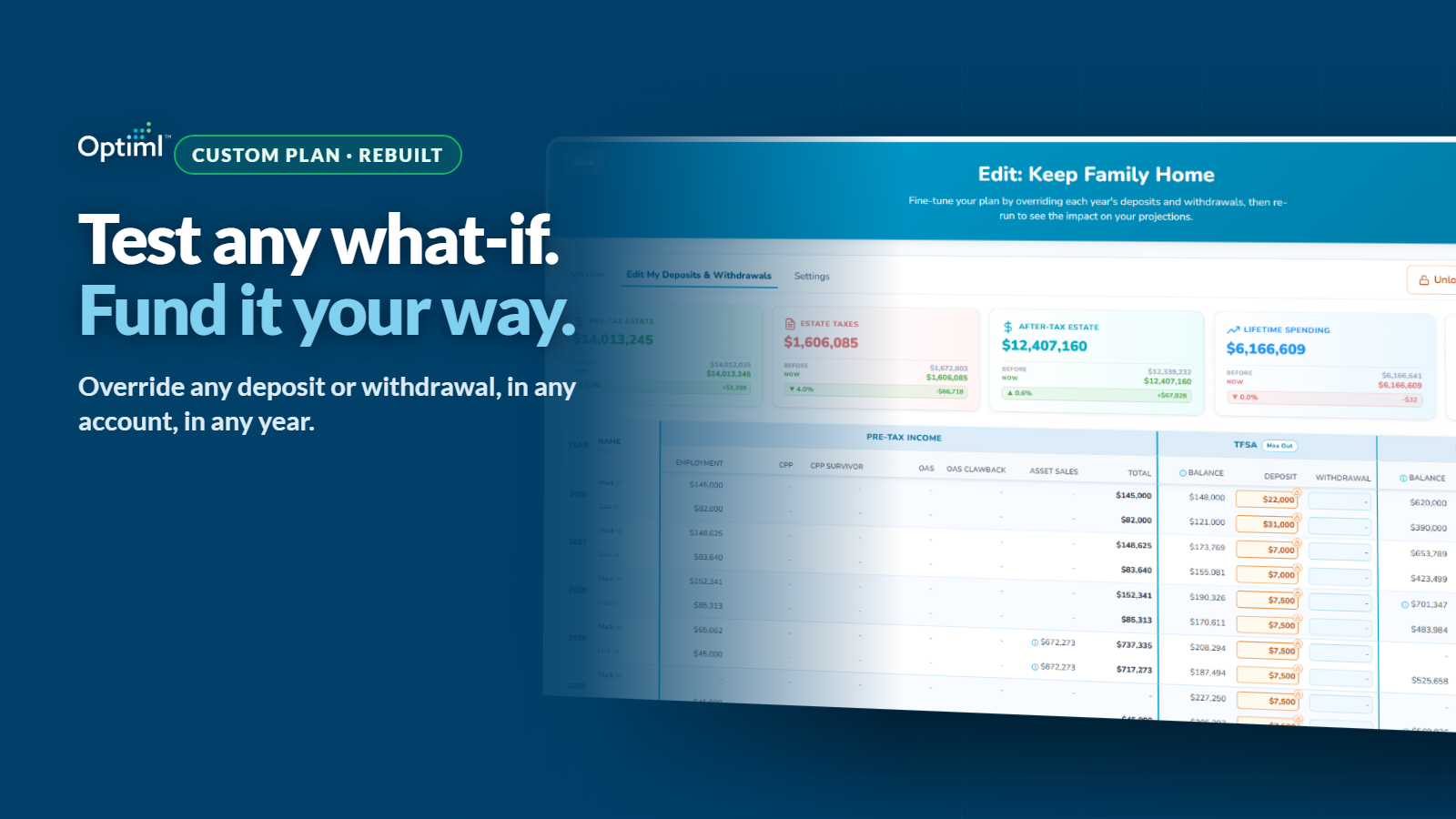
What if I paid for the new roof out of the TFSA (Tax-Free Savings Account) instead of the non-registered account?
What if I retired at 60, and bridged those years the way I actually want to, instead of the way the math picked?
What if I maxed out my RRSP (Registered Retirement Savings Plan) every year from here on, rather than only some years?
Some of that you could always test. Changing your retirement age and re-running has been there all along. What you could never do was change it and then say: and here is how I want to pay for it.
That is the part that is new.
Custom Plan has been rebuilt from the ground up, and it is now fully controlled by you. Any deposit, any withdrawal, any account, any year. You can test the what-if you always wanted to test, and still follow the plan you always wanted to follow, at the same time.
Why we rebuilt Custom Plan
We heard the same thing from members for months. The deposit and withdrawal strategies they actually wanted to test could not be easily modelled. The functionality they needed either was not there, or it was too difficult to work with. People would open Custom Plan with a specific question in mind, poke at it, and close it without an answer.
That is a real gap. If the whole promise of Optiml is that you see your retirement before you live it, then the one place you go to test your own ideas cannot be the hardest part of the platform to use.
So we did not patch it. We rebuilt it from the ground up, driven entirely by that feedback.
The result is a Custom Plan that is fully controlled by you. Every deposit and every withdrawal can be overridden, year by year. Not a slider that approximates what you meant. The actual number, in the actual account, in the actual year.
The change members asked for most: your overrides now save
Ask members what they wanted most and the answer was not a new feature. It was permanence.
Manual overrides now save.
Once you launch into your Custom Plan, the changes you made are yours. Go back and edit that plan later, and your overrides are still sitting there. Duplicate the plan to try a variation, and the overrides come with it.
That sounds small. It is not.
Overrides that vanish turn every session into a one-off experiment. You rebuild your assumptions from scratch each time, so you never get past the first question. You test funding something out of the TFSA, you get an answer, and then the thought that actually matters ("okay, but what if I split it across two years instead?") costs you the entire setup again.
Overrides that persist turn a plan into a starting point. You build the scenario once. Then you duplicate it and layer the next idea on top. Then you duplicate that one. Scenario by scenario, you are not re-answering the same question. You are building on it.
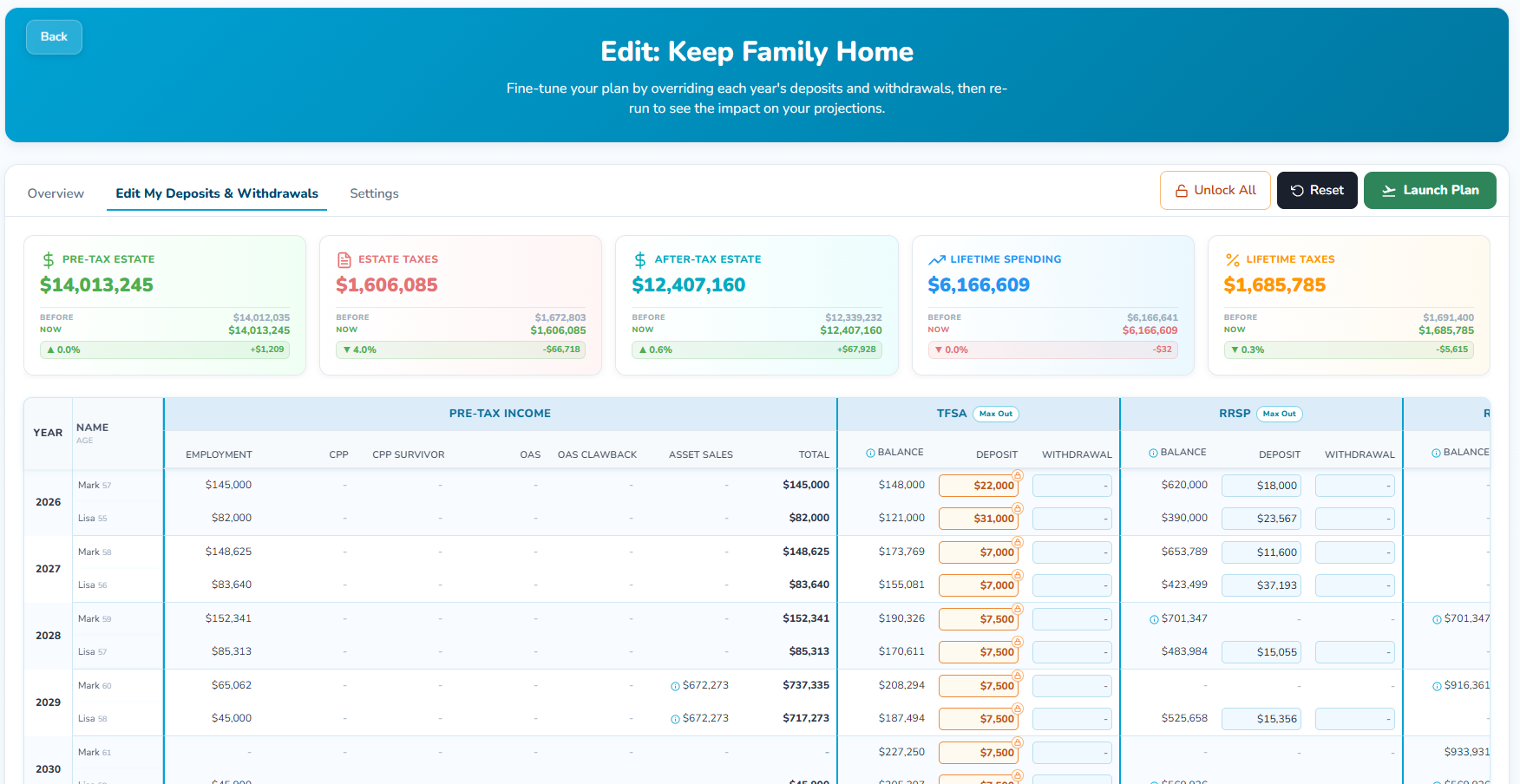
The editor puts the whole thing in one table. Every year down the side, each person's age, their pre-tax income sources, then their accounts, each with a balance, a deposit cell, and a withdrawal cell. Change a cell and it highlights, so you can always see your own fingerprints on the plan. Five impact cards sit across the top: Pre-Tax Estate, Estate Taxes, After-Tax Estate, Lifetime Spending, and Lifetime Taxes. Each one shows BEFORE, NOW, and the difference between them.
That is your scoreboard. Everything below is how to move it on purpose.
Start with the question, not the spreadsheet
Before the scenarios, it is worth being clear about what actually changed, because this is a layering thing and the layers are easy to blur.
The big levers have always been yours. When you retire. What you spend. When you take your benefits. Which overall retirement strategy fits your life. Change them, re-run, see the impact. None of that is new, and none of it needs Custom Plan.
But look at what happened next. Once you moved the lever, Optiml decided how to fund it. Withdrawal Optimization modelled the optimal sequence across your accounts and paid for your scenario the cheapest way it could find. That is the engine doing its job, and for most people most of the time, it is exactly the answer you want.
What you could not do was say: retire at 60, and bridge those years from the non-registered account, because I want to leave the RRSP alone for now.
Custom Plan is that missing half. It is the layer underneath the big levers, and its controls are deposits and withdrawals: which account, which year, how much. Set the lever in your plan, then come here and fund it your way.
Which raises a fair question. Why would you override an engine that is already working to lower your tax bill?
Let us be clear about this first. Max Value is still the best, most optimized plan we can build for you. Nothing here changes that. If you want the mathematically strongest outcome, that is it, and overriding it will usually cost you something.
But two things are also true.
The first is that the math does not always meet your exact reality. Maybe you want to preserve the TFSA for what you leave behind, because it lands in your family's hands clean. Maybe you have one specific purchase in one specific year. Maybe you have a reason the optimizer cannot know about, because you never told it, and you never told it because there was no field for it. The optimizer is optimizing for tax. You are optimizing for your life.
The second is that you may simply want to test something specific. You read something, you have a theory, you want to see the math rather than take our word for it. Fair. Go check.
Now you can do both. And because your overrides run against the same engine, you see the tradeoff instantly. What your preference costs, in lifetime taxes, in lifetime spending, and in what you leave behind, before you commit to it.
That is the point. Not to beat Max Value. To find out what your version costs, and decide whether it is worth it to you.
So pick one question. Make the smallest set of changes that represents it. Re-run. One question, one scenario. Change six things at once and you will get an answer you cannot interpret, which is the same as no answer at all.
Here are four questions worth asking.
What if I paid for this out of the TFSA instead of the non-registered account?
This is the question Custom Plan was rebuilt for.
Something big is coming. A vehicle, a roof, a wedding, a year of travel while everyone is still up for it. You are not asking whether you can afford it. You already decided that. You are asking where the money should come from.
Because that choice is not neutral.
Pull it from the non-registered account and you may realize capital gains, which land on your return that year and stack on top of whatever else you have going on. Pull it from the TFSA and the withdrawal is not taxable, but you have spent down the account that grows tax-free and comes out clean later. Pull it from the RRSP and every dollar is taxable income in a single year, at whatever bracket that pushes you into.
Same purchase. Same lifestyle. Same retirement date. Three completely different tax consequences, and three different plans on the other side of it.
In the editor, you just say it. Find the year. Put the withdrawal in the account you want it to come from, and take it out of the one you don't. Re-run.
Then read the scoreboard. Lifetime Taxes, Lifetime Spending, After-Tax Estate. The answer is right there, in your numbers, for your accounts, in your situation.
That is the whole feature in one question.
What if I retire at 60, and fund the bridge my way?
Retiring at 60 means several years with no employment income, and likely no CPP (Canada Pension Plan) or OAS (Old Age Security) yet either. Something has to fund those years. That is the bridge.
You could always test the retirement age. Change it, re-run, and Optiml would build you a bridge, funded the way the optimizer judged best.
The new part is that the bridge is now yours to build.
Maybe you want the non-registered account to carry those years, so the RRSP keeps growing untouched. Maybe you want the exact opposite: draw the RRSP down hard while your income is at its lowest, because that window narrows the moment benefits start. Maybe you want to split it, and you have a specific split in mind.
In the editor you just say it. Find the bridge years. Put the withdrawals in the accounts you want them to come from, in the amounts you want, year by year. Re-run.
Here is the part people find counterintuitive: you should expect shortfalls. Fund those years your way instead of the optimizer's way, and some of them will come up short against what you wanted to spend. That is not the tool failing. That is the tool telling you the truth about the trade.
Resolving those shortfalls is where the answer lives. Each one is a decision about which account covers the gap. When you are done, you have the actual plan: retiring at 60, funded your way, with a number attached for what your preference cost in lifetime taxes and in what you leave behind.
Benefit timing pulls at this too. That is its own decision with its own math, and we already ran CPP at 60 versus 70 both ways. Set it in your plan, then come back and fund the result here.
The same move works for any big lever. Spending genuinely changes shape across a retirement, and plenty of Canadians could comfortably spend more than they do in the years they are healthiest. Raise the spending in your plan, then come to Custom Plan and choose where the extra comes from, rather than accepting wherever the optimizer would have taken it.
What if I maxed out my TFSA every year? My RRSP?
Everybody has heard the advice. Max out your TFSA. Max out your RRSP. It gets repeated so often it barely registers as a claim anymore.
But it is a claim, and it is testable. We have written before about whether you should max out your TFSA every year, and the honest answer is that it depends on the rest of your picture. The point is not to trust our answer. It is to run yours.
This is the easiest scenario in the whole editor, because you do not have to type anything. The TFSA and RRSP columns each have a Max Out button right in the header. Click it and the plan fills those deposits to the maximum for you, year by year.
Then look at the scoreboard.
Maxing the TFSA every year is not free. The money is coming from somewhere: cash you would have spent, or a withdrawal you would have taken from somewhere else. That is the trade, and it shows up in Lifetime Spending. Maxing the RRSP is a different trade again, because those deposits lower your tax now and grow a balance you have to draw down later, at whatever bracket you happen to be in then.
Both are defensible. Neither is automatic.
Click the button, re-run, and see which one your plan actually likes. Then try it the other way. It takes about as long as reading the advice did.
What if I melted down my RRSP on my own schedule?
The RRSP Meltdown is one of the strategies we get asked about most, and for good reason. We have covered how the RRSP Meltdown works, and why a partial RRSP to RRIF conversion before 71 is worth a serious look.
Reading about it is one thing. Shaping it with your own hands is another.
This one is purely about the shape of the withdrawals. How much comes out of the RRSP, in which years, in what pattern, before RRIF (Registered Retirement Income Fund) minimums start dictating the pace for you.
Maybe you want to pull hard in a particular window and then ease off. Maybe you have a year with unusual income and you want to skip it entirely. Maybe you want to see what happens if you are simply more aggressive than the plan suggests.
So do it. The RRSP withdrawal cell is right there, year by year. Type what you want to take out in each one. Aggressive early, flat, front-loaded, whatever shape you have in your head. Re-run and watch the Lifetime Taxes card.
This is where Custom Plan earns its name. You are not choosing from three preset meltdown speeds. You are drawing the curve yourself, one year at a time, and getting the tax consequence back.
If your shape beats the default, that is worth knowing. If it does not, that is worth knowing too.
Your plan starts balanced. Then you touch it.
Before you start editing, your plan balances perfectly.
That is not a figure of speech. Your plan was built to deliver exactly the after-tax income you said you wanted, in every single year. The deposits and withdrawals are all sized to hit that number. Nothing is left over and nothing is missing.
The moment you change a deposit or a withdrawal, that balance shifts.
Some years end up with more money available than you needed. That is a surplus. Some years end up without enough to cover what you wanted to spend. That is a shortfall. Both are measured against the same thing: the after-tax income you told the plan you want in that year.
And they do not stay put. Money you did not withdraw keeps growing. Money you pulled early is not there compounding later. Small changes ripple forward and compound into years you were not even thinking about when you made the edit. Move one number in your sixties and you are quietly moving your eighties too.
This is exactly why the rest of this post exists. A tool that lets you change anything without telling you what your changes did downstream is not a planning tool. It is a spreadsheet with extra steps.
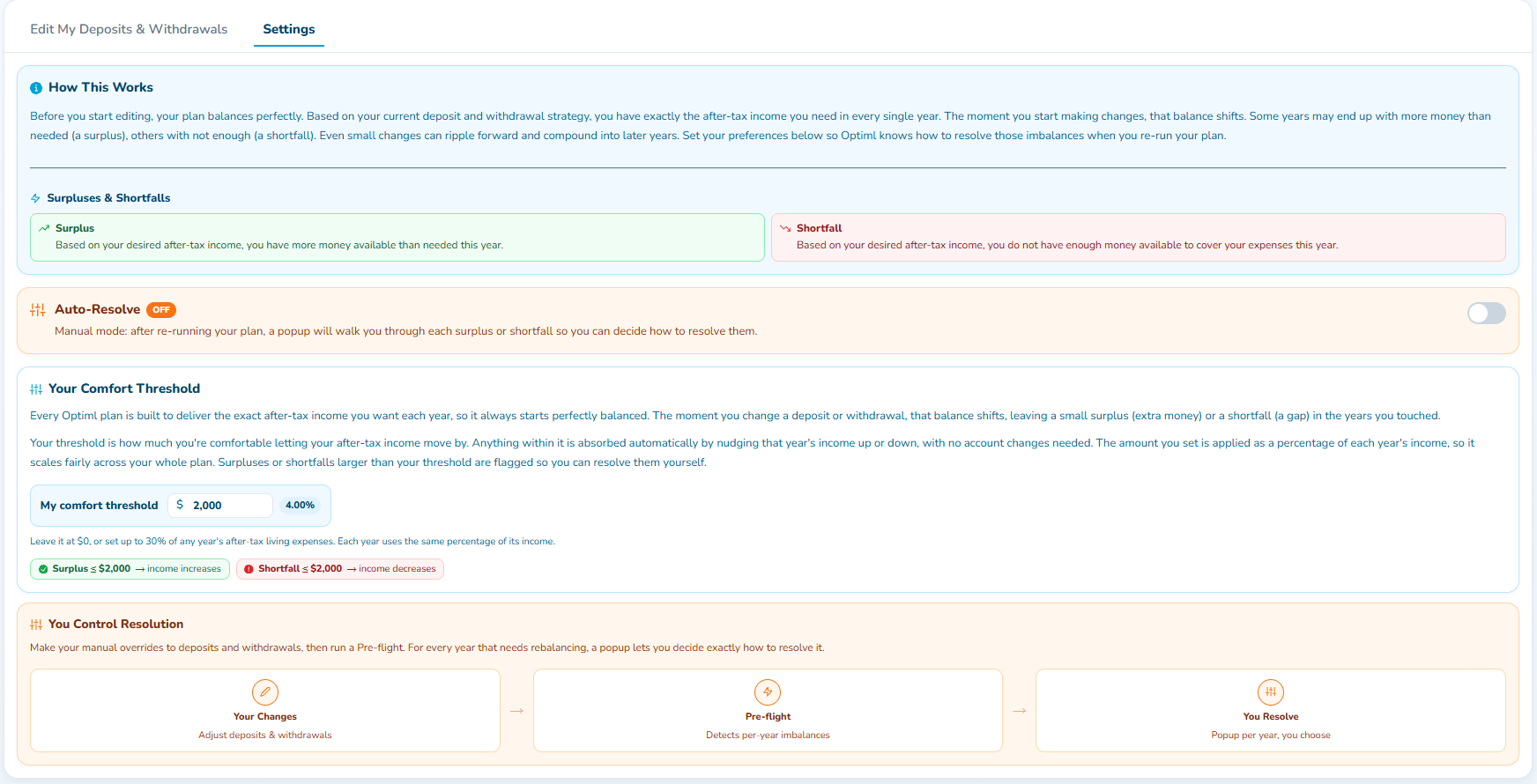
So the first thing to set is your Comfort Threshold.
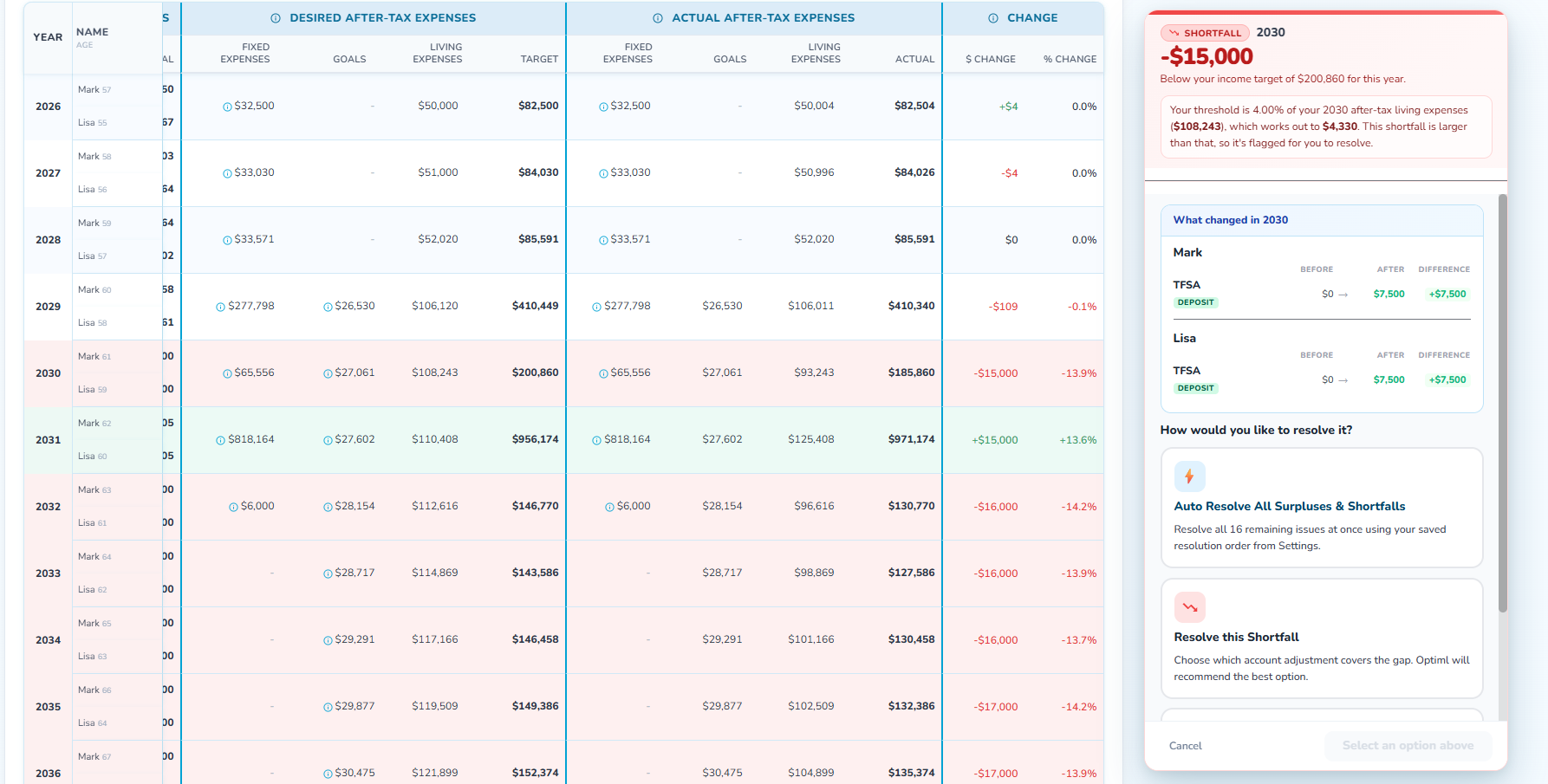
The Comfort Threshold is how much you are comfortable letting your after-tax income move in a given year. Anything inside it gets absorbed automatically: the plan nudges that year's income up or down slightly and moves on, with no account changes needed. Anything larger gets flagged for you to resolve.
You set it anywhere from $0 up to 30% of any year's after-tax living expenses. It applies as a percentage of each year's income, so it scales sensibly across your whole plan instead of being a fixed dollar amount that means one thing at 62 and something else entirely at 88.
Set it low and you will see every wobble. Set it higher and you will only hear about the things that actually matter to you.
Pre-flight: see what your changes did before you commit
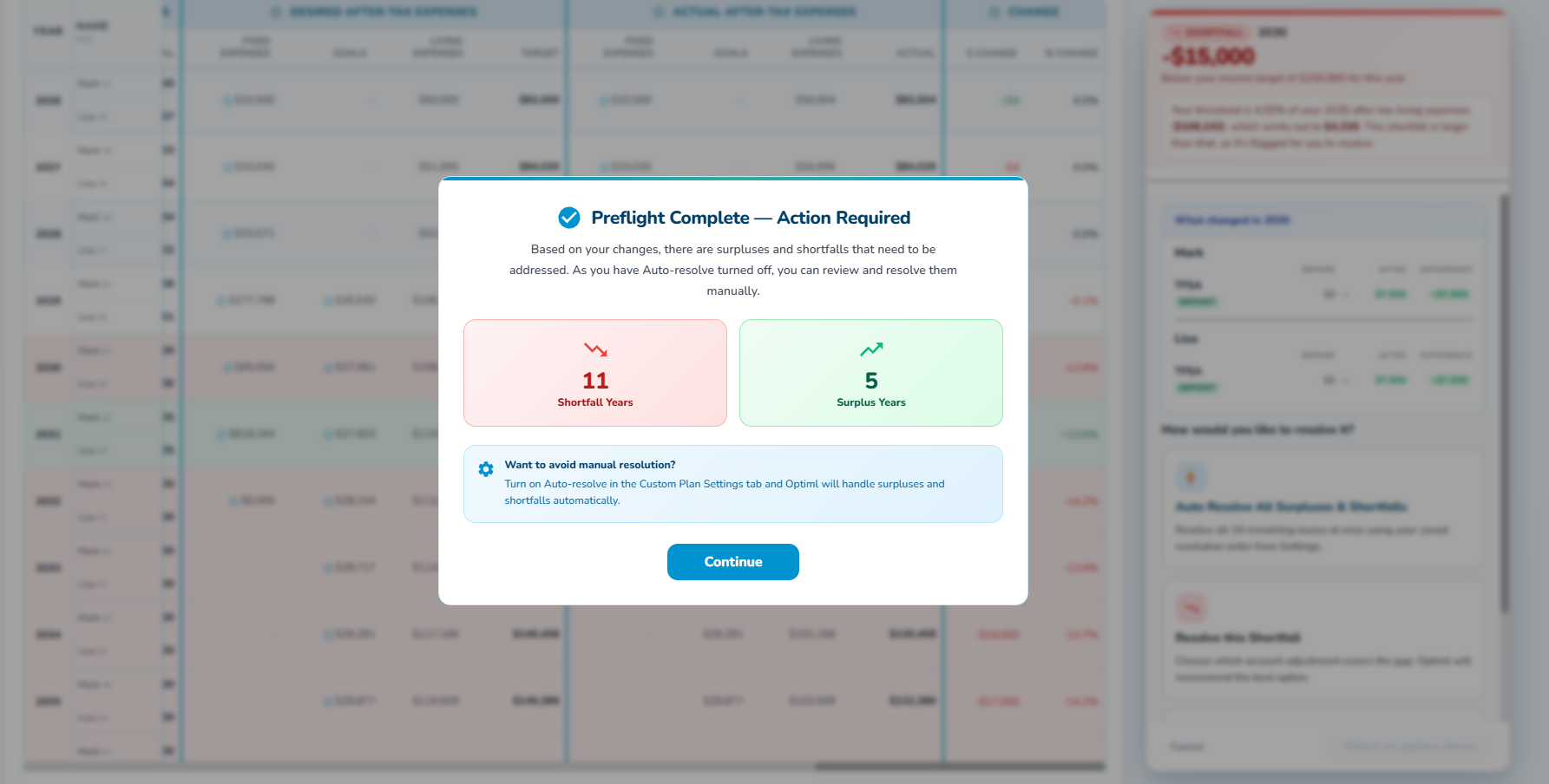
Once you have made your changes, Optiml runs a Pre-flight.
It is exactly what it sounds like. Before your edited plan becomes your plan, Pre-flight goes through it year by year and detects every imbalance your changes created. Then it tells you the count: how many shortfall years, how many surplus years.
The whole flow is three steps. Your Changes, where you adjust the deposits and withdrawals. Pre-flight, where the plan detects the per-year imbalances. You Resolve, where you decide what to do about them.
That middle step is the one people underestimate. Seeing how many years fell out of balance, before you commit to anything, is genuinely useful on its own. It is a measure of how big a swing you just took. A couple of shortfall years means you nudged something. A long list means you changed the architecture of your retirement, and you should probably know that before you go any further.
Nothing is broken at this point. Nothing is locked in. You changed something significant and the plan is telling you so, in advance, with a number attached.
Auto-Resolve, or resolve it yourself year by year
Now the choice.
Auto-Resolve is a toggle in the Custom Plan Settings tab, and it has two honest modes.
Leave Auto-Resolve ON and Optiml handles the surpluses and shortfalls for you, using your saved resolution order. You make your changes, it sorts out the consequences, you read the result. Fast. If you are testing five variations of an idea and you just want the scoreboard, this is the mode you want.
Turn Auto-Resolve OFF and something better happens.
In manual mode, after you re-run, a popup walks you through each surplus and shortfall so you can decide how to resolve them. Every year with a gap gets laid out: the year, the amount, whether it is a shortfall or a surplus, and how far it sits from your income target for that year. Shortfall years are shaded red and surplus years green, so the pattern is visible at a glance.
Then it shows you the thing that actually teaches you something. A panel called "What changed" in that year, broken down per person and per account, as BEFORE, AFTER, and DIFFERENCE.
That is the why. Not "your plan moved." Not "here is a new number." But precisely which account, for which person, moved how much, in the year you are looking at.
Then it asks how you want to resolve it, and gives you real options: resolve all the remaining issues at once using your saved resolution order, or resolve this one shortfall by choosing which account adjustment covers the gap. Optiml recommends the best option. You pick.
Auto-Resolve ON is the fast mode. Auto-Resolve OFF is the teaching mode. It is slower, and it is the one that makes you a better planner, because you are making every call and seeing what each call costs.
Most people should turn it off at least once.
Where to start
Do not open Custom Plan and try to rebuild your whole retirement.
Open it with one question. The one you have actually been wondering about. The specific one, about the specific account, in the specific year.
Pay for it out of the TFSA instead of the non-registered account. Retire at 60 and bridge it your way. Max the RRSP every year instead of some years. Draw the RRSP down in the shape you want. Pick one, build it, re-run it, resolve it, and read the scoreboard. Then duplicate it and layer the next idea on top, because your overrides are still there waiting.
Once you have two or three scenarios you believe in, Compare Plans is where you put them side by side and see how every decision impacts your future. Custom Plan is how you build a scenario. Compare Plans is how you choose between them.
The new Custom Plan is available on Pro+ and Legacy.
You have been running these what-ifs in your head for years. Now you can run one properly, and fund it your way.
Ready to optimize your retirement plan?
Join thousands of Canadians making smarter financial decisions with Optiml.
Start Free Trial